
MCP server
BetaLet an AI agent use Deplo with the same permissions a person has.
Beta
This feature is currently beta/experimental and subject to change. It is not recommended for production. Try it out and share your feedback on our GitHub.
Let an AI agent work on your infrastructure: deploy an app, read logs, check why a build failed, restart a database. Deplo speaks the Model Context Protocol (MCP), the same protocol Claude, ChatGPT and coding agents use to reach tools.
Settings -> MCP Server is visible to anyone with Connect AI agents (manage_mcp) and
to whoever manages the team's settings. The token created there is personal, listed only under
your Settings -> API tokens.
Connect an agent
Open the MCP settings
Settings -> MCP Server.
Pick the agent
Claude, ChatGPT, Claude Desktop, Claude Code, Cursor, VS Code, Windsurf, Gemini CLI, Codex CLI, or Something else.
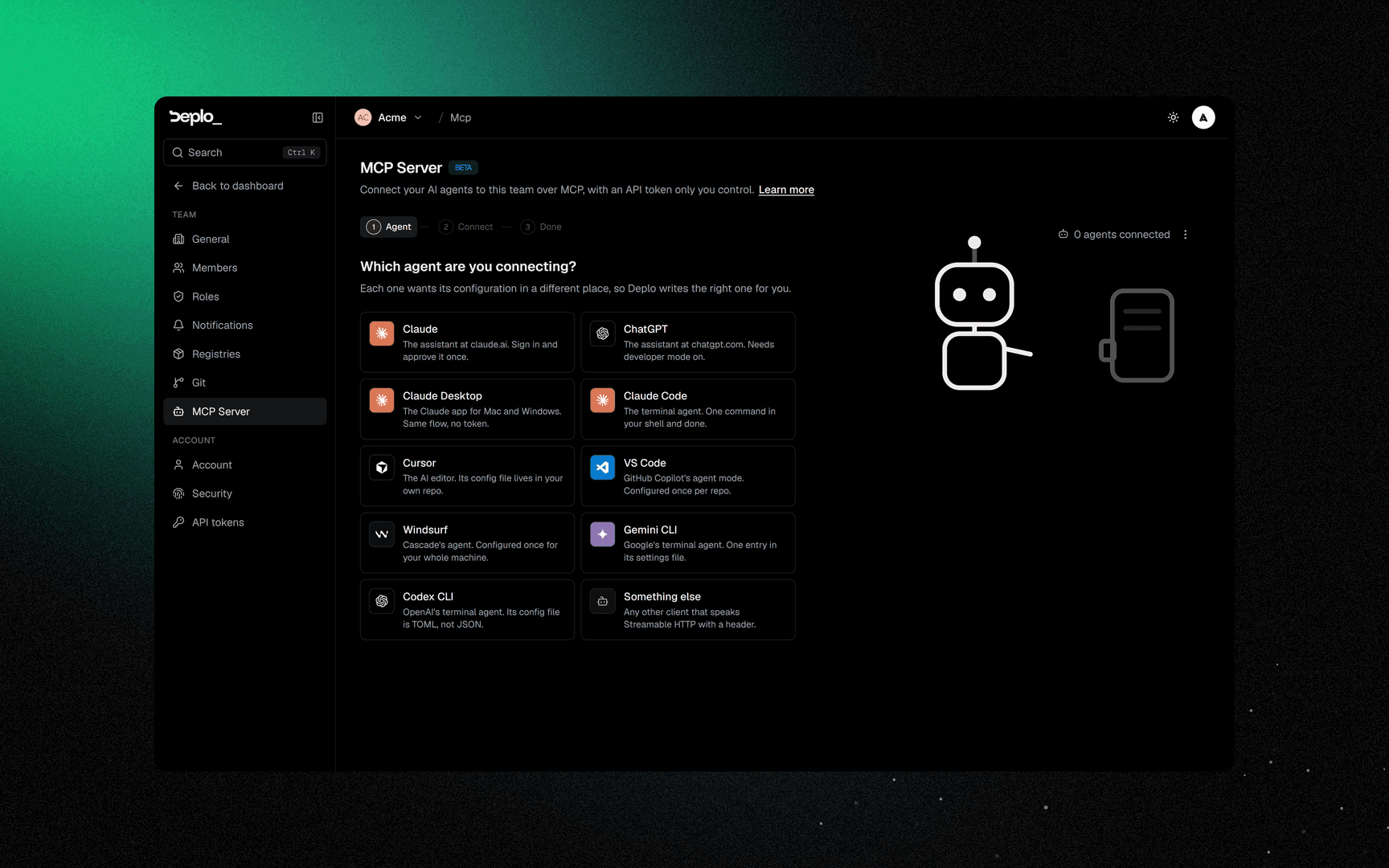
Turn MCP on
Click Turn on MCP for this team if it is still off. This is a team setting and needs Manage team settings. Later you find it in the menu next to the agents connected count.
Create a token
Click Create token. Start from a Template or pick capabilities yourself, and set an expiry. By default the agent reaches every team you can connect agents to. Narrow it under Access if it should see only one.
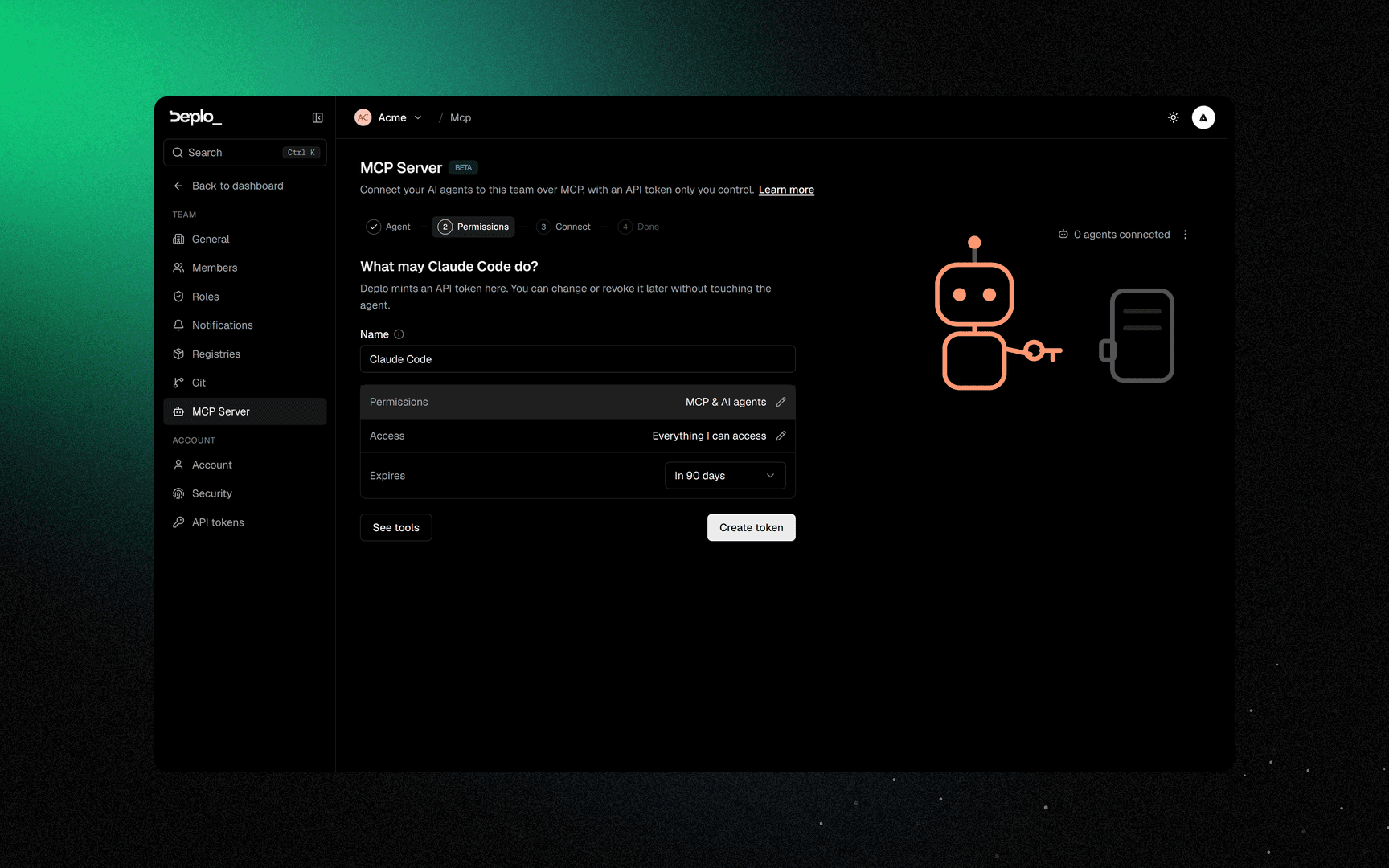
Paste the config
Copy the configuration shown on the page and paste it where the agent expects it. The token is shown once: if you leave the page before the agent connects, create a new one.
It goes in the agent's settings for your whole machine, not in one project, so Deplo stays
connected in every folder you open. Replacing the token in Claude Code? Run
claude mcp remove Deplo -s user first, or the new command stops at "already exists".
Start the agent
Deplo waits for the agent's first call. Start the agent, or ask it to list its tools.
Nothing after a few minutes? A Check again button appears. Connect another repeats the steps for the next agent.
A web agent such as claude.ai or chatgpt.com does not take a pasted token. It goes through the OAuth consent screen instead, which creates a token after you approve it.
The endpoint is /api/mcp on your own instance. It exposes one tool per action, and every tool
goes through the same permission checks a person goes through.
Three things control access:
- A team switch, off by default for a new team. It decides whether agents may work in this team at all. Changing it needs Manage team settings.
- A capability, Connect AI agents (
manage_mcp). A token works in a team only if its owner has it there. Remove it and every agent of theirs is refused in that team, immediately. - A token. An agent signs in with a normal API token, and it can do only what the token's capabilities allow.
When an agent connects, Deplo gives it a short introduction: what Deplo is, the words it uses (App, Project, Environment, Folder, Server), how to work in another team, and a link to this manual. You do not have to explain the product to your agent.
Working in several teams
A connection reaches every team its owner may connect agents to. Every call still runs in one team:
whoaminames the default team.list_teamsnames every team the connection can act in, and says why one cannot be used (MCP off, or the permission missing).- Every tool takes an optional
teamargument (id or slug). Passing it is how the agent changes team. findsearches every team at once and says which team each result is in.
A terminal agent can also set its default team with the X-Deplo-Team header.
Apps with more than one container
A Compose app runs several containers, so an action on "the app" has to say which one. The
names are the service names in the compose file, and get_app returns them:
- A domain names the container that serves it, and its port. Two hostnames can reach two
different containers of the same app, and one hostname can serve a second container under a
path such as
/api. - A cron job names the container the command runs in. Without it, the job runs in any container of the stack that is up.
- A log read names the container the same way.
A typical exchange:
get_app         slug: analytics                                     -> the compose file, with the names
add_domain      appId, name: app.acme.com, service: client,  port: 3002
add_domain      appId, name: api.acme.com, service: backend, port: 3001
render_compose  appId                                               -> the routing that was written
Got one wrong? update_domain moves a hostname to another container without deleting it.
Six names are reserved by Deplo - deplo, deplo-traefik, traefik, postgres,
deplo-socket-proxy and docker-socket-proxy - in any capitalisation. A domain cannot point
at a container with one of these names, or with one of them as hostname:. Rename it in the
compose file if needed.
See and revoke what is connected
Your agents are your tokens: Settings -> API tokens lists them with the agent's name. Edit changes what one may do, Revoke ends it. Revoking is immediate and applies to every team the agent reached.
The team sees only a number: agents connected on the MCP page, and per member under Settings -> Members. To disconnect somebody else's agent, remove their Connect AI agents capability, or remove them from the team.
What an agent can and cannot do
Can, if the token allows it: almost everything the dashboard does. Apps and their settings, a Compose file, deployments, environment and shared variables, domains, databases, logs and metrics, backups and restores, cron jobs, previews, projects, environments and folders, roles and members, notifications, git connections. An instance admin can also manage servers, certificates, Docker cleanup, the panel's address and updates.
Cannot, ever: reveal a secret. No tool exposes one, whatever the token allows.
Deplo adds no confirmation step of its own. Destructive tools are flagged so the agent's client can ask you first. If your agent does not ask, give it a token that cannot do what you would not want it to do.
Good to know
- Off by default for a new team. Letting an AI act on your infrastructure is a choice.
- A call acts in one team at a time. The agent picks it with the
teamargument; the default comes from theX-Deplo-Teamheader. - A token can never do more than its owner. Its power is what it was granted, limited to what the person who created it can still do, in each team.
- Scope it. A token can be limited to one project, one folder or one app. This is safer than trusting a prompt.
- Everything is in the activity log, including who connected the agent.
Troubleshooting
- The agent connects and sees no tools - MCP is off for that team.
- Every call is refused - the token lacks the capability, or the team requires two-factor and its owner has not set it up.
- "You may not connect AI agents to this team" - you lost the Connect AI agents capability there. The reply lists the teams the connection can still use.
- The agent cannot reach the endpoint - your panel address must be reachable from where the agent runs.
- The same refusal keeps coming back - the agent is passing an argument the tool does not take. The reply names it and lists the valid ones.
More in Sign-in and access troubleshooting.
When no tool fits
Two generic tools cover the rest:
graphql_queryreads anything in Deplo's API.graphql_mutatewrites anything in it.
They run a query written by the agent, with the same permission checks as every other tool. The agent can discover what exists by asking the schema.
Two things they never do, whatever the token allows: return a credential (a password, connection string, token or install command) and run a command inside a container.
Because graphql_mutate covers everything from a rename to a deletion, it is always flagged
destructive, so your agent asks before using it.
Every tool
Deplo exposes 184 tools today, plus the two above. The number changes with the product. While creating a token, See which lists them all, marks the ones the token would reach and flags the destructive ones. An agent only sees the tools its token can use.
Needs is the capability the token must have. Kind is what the agent's client is told before running the tool: a destructive one is where a good client asks you first.
Next steps
Did this page help you?