
Compose apps
Run a docker-compose.yml stack on Deplo, with routing, TLS, variables, volumes and backups layered on top.
Paste a docker-compose.yml to run several containers as one app. Deplo adds
routing, TLS, variables, volumes and backups on top.
Use it for software that ships as a Compose stack or for your own multi-service setup. For a single image, Deploy a Docker image is simpler.
Your YAML is treated as authored input, not a trusted document. Deplo parses it, checks it, folds in what it must, and ships the result to the agent.
What it folds in:
- Your environment's own network, added to every service on top of the
networks your file already declares, so they reach the other apps and managed
databases in that environment by name - and nothing outside it. A service
stays off it only if it sets
network_mode:, if its name is one the platform answers to, or if you marked all its networksinternal: true. - Traefik labels for each domain you add, pointing at the service you named on that domain.
- Your environment variables, injected into every service as
pass-through entries. Values ride in a
0600env file next to the stack. - Your storage rows, mounted into the service you named.
What it drops or refuses:
aliases:on a network Deplo owns are dropped. Every container already registers its service name there, and Docker round-robins a name two containers both claim. Aliases on your own private networks are yours and are kept.networks: [deplo]is rewritten, not refused. Whatever you wrote lands on your environment's network. Copy-pasted compose files and imports from other platforms keep working. The same is true of a network you point somewhere else on purpose,defaultincluded: any key naming a network Deplo manages ends up on your own environment's, under the single keydeplo.- Do not call a network of your own
deplo. That key is Deplo's, so a network you declare under it is replaced by your environment's - and if you had marked itinternal: true, the seal goes with it. Any other name is yours and is kept. network_mode:may not name a network. Anything butnoneanddefaultneeds the host permission, because every other value is a docker network name -bridgeincluded, which is the one docker shares between everything that asks for it. One naming a network Deplo manages is refused outright, and so is one filled in from a variable ($NETas much as${NET}), since the value only exists atcompose upand nothing can inspect it before then.network_mode: container:<name>is refused before either check: it hands your container another container's whole stack.- Six names belong to the platform:
deplo,postgres,traefik,deplo-traefik,deplo-socket-proxyanddocker-socket-proxy. The proxy resolves two of those by name from inside your network, so claiming one collects the panel's traffic or the proxy's routing config. The editor warns about them; a service actually joining the shared network under one of these names is refused, and one that would not have joined is simply left off it and keeps a privatedefaultinstead. - A service claims more than its own name. The refusal also covers
hostname:, which Docker registers in DNS exactly like a service name, and it ignores capitalisation, because DNS does:Postgresanswers apostgreslookup. The network is resolved by name too, so referencing it under a different key does not get around any of this. - A service cannot be named after a managed database that shares its network.
A database answers to
db-<name>, so a service of that name would collect its connections. One in another environment is not a clash - your stack never joins its network. - Two of your own stacks CAN claim one name, and the deploy warns. Inside
one environment nothing refuses a second
weborapi; Docker would split the lookups between them, so the deploy log names the other stack and you rename one. Only the services you route, or attach to the network yourself, take a name there.
Create a Compose app
Start from scratch
Add new, then Application. The wizard's first step is where you pick the source - or Template, to start from the catalogue instead.
Paste and lint
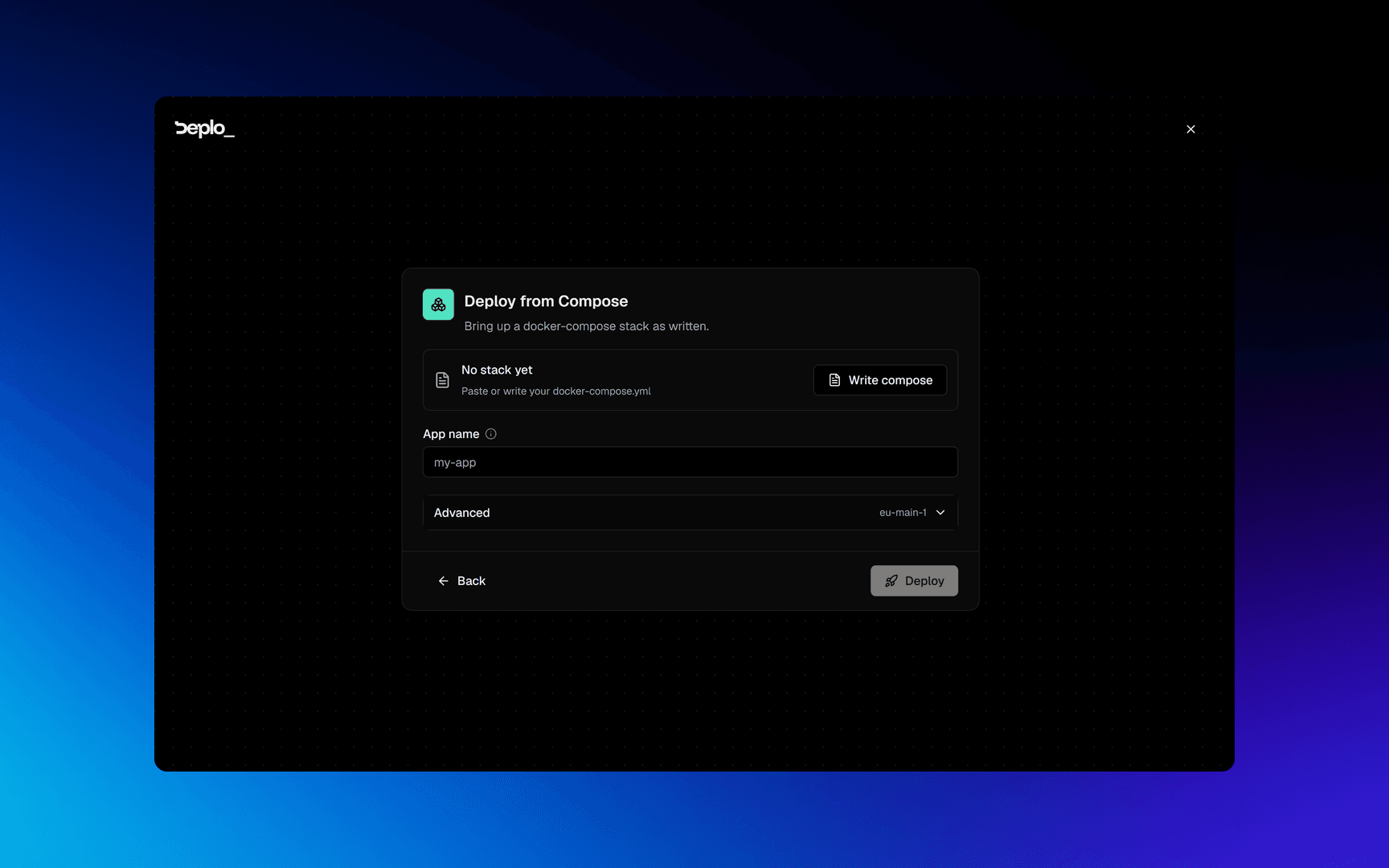
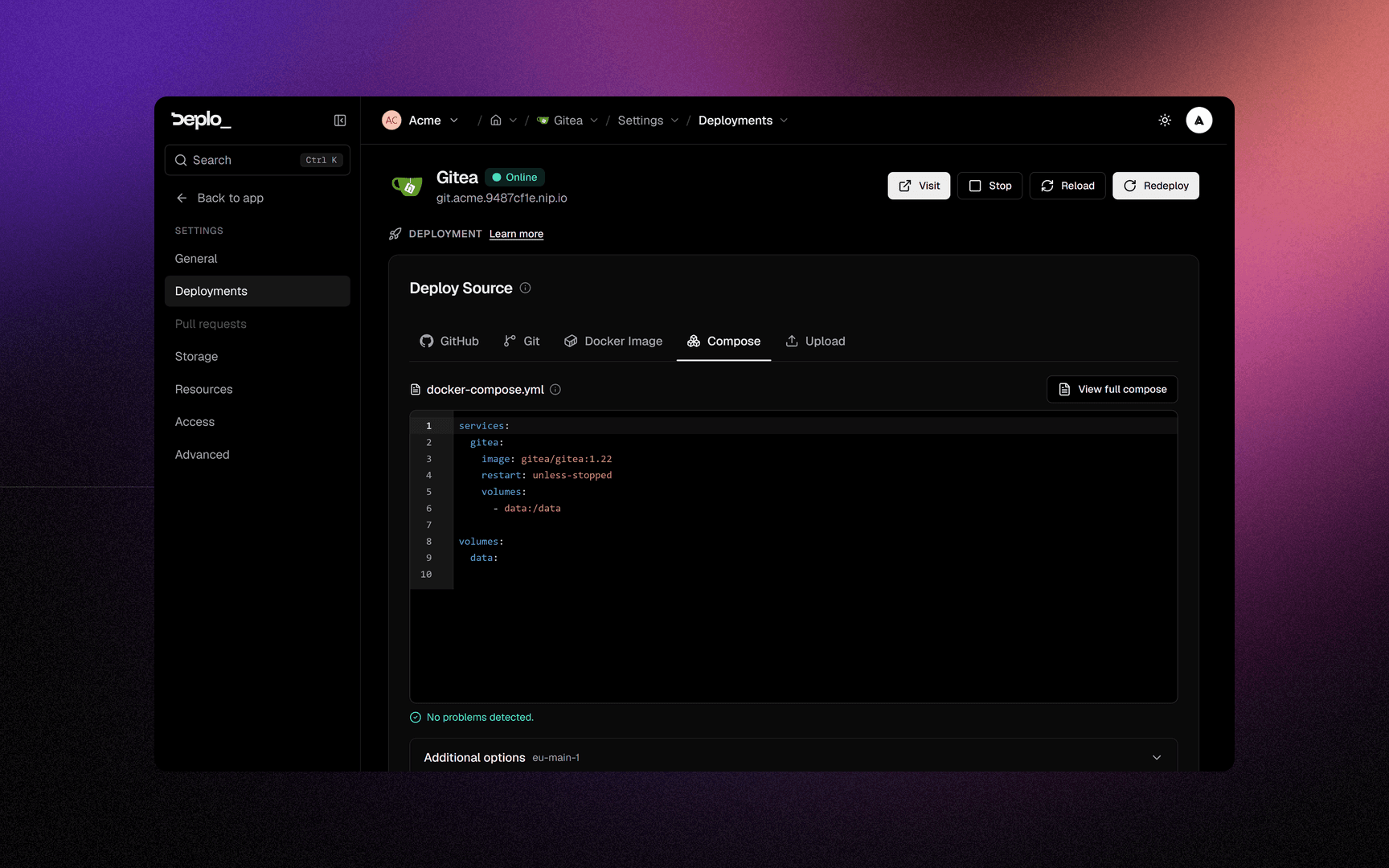
Click Write compose and paste your file. The editor lints as you type and tells you what will be rewritten, what needs a permission, and what gets refused. Save, and the card reports how many services the stack has.
Pick what gets a domain
The card below lists every service in the stack. The one Deplo picked as the front door is ticked and marked Primary; tick any other service that needs an address of its own. Databases are listed but never pre-selected.
Deploy
App name is filled in from the first service. The server and the extra
docker compose up flags are under Advanced. Click Deploy.
Edit the file later in Settings -> Deployments.
Which service gets the address
A stack has several containers, but only one of them is the front door. Deplo picks it when you save the file, and the wizard shows you the choice:
- The candidates are the services that publish or expose a port - your file saying "here" - or all of them when none does.
- Among those, it is the one nothing else waits on in
depends_on: the service sitting in front of the others. - A database is never picked. Postgres, MySQL, MariaDB, MongoDB, Redis and ClickHouse are skipped, unless the stack is nothing but databases.
Everything stays editable in Domains, where each row names the service it routes to.
One address, two services
Some stacks want the UI on / and its API on /api of the same hostname,
because they only take one base URL. Add the second row in Domains with the
same hostname and a Path of /api.
How Compose apps differ
| Field | What changes |
|---|---|
| Domains name a container | A domain routes to one Compose service. This field replaces the port override, because your file already declares the ports. |
| No rollbacks | There is no single image Deplo built, so there is nothing to re-run. The app header carries Stop and Reload in that slot instead. |
| No build server | Same reason. |
| Storage names a service | Every storage row says which service to mount into. A name your file does not contain is a hard error, never a silent remount. |
| Cron jobs name a service | Blank means the stack's main container. |
| Redeploy pulls every image | A redeploy fetches what each service's tag points at now, so a stack on :latest updates when you click Redeploy. Nothing watches the registry for you. |
Your file is read as you wrote it
- Anchors and merge keys work, in both spellings:
x-common: &commonwith<<: *common, and the explicitly tagged!!merge <<: *commonthat large stacks use. - An
environment:value keeps its text.UMASK: 022reaches the container as022, not as22, andVERSION: 1.10stays1.10. YAML would read both as numbers; a variable is text by the time a container reads it.
Middlewares in a compose file
Routes come from Domains, never from labels. A traefik.http.routers.* or
traefik.http.services.* label is dropped, and both the editor and the deploy log name it.
A middleware label of a supported kind is kept, and applied to every domain of the service that declares it, in the order written:
services:
  web:
    image: nginx:1.27
    labels:
      - traefik.http.middlewares.cache.headers.customresponseheaders.Cache-Control=public, max-age=3600
- traefik.http.middlewares.gz.compress=true- No router label is needed. Deplo attaches the middleware to the service's domains itself.
- The name belongs to the stack. Deplo renames
gzwhen it deploys, so another app can neither collide with it nor use it. - Supported kinds:
headers,compress,ratelimit,inflightreq,ipallowlist,redirectscheme,redirectregex,addprefix,stripprefix,stripprefixregex,replacepath,replacepathregex,buffering,retry,circuitbreaker,contenttype,grpcweb, andbasicauth/digestauthwithusers. - Dropped:
forwardauth,errors,chain,plugin, ausersfileand a Redis-backedratelimit. Each one makes the proxy reach something outside your app. - The common security headers need no YAML. A domain's Security headers switch sends them.
Extra flags
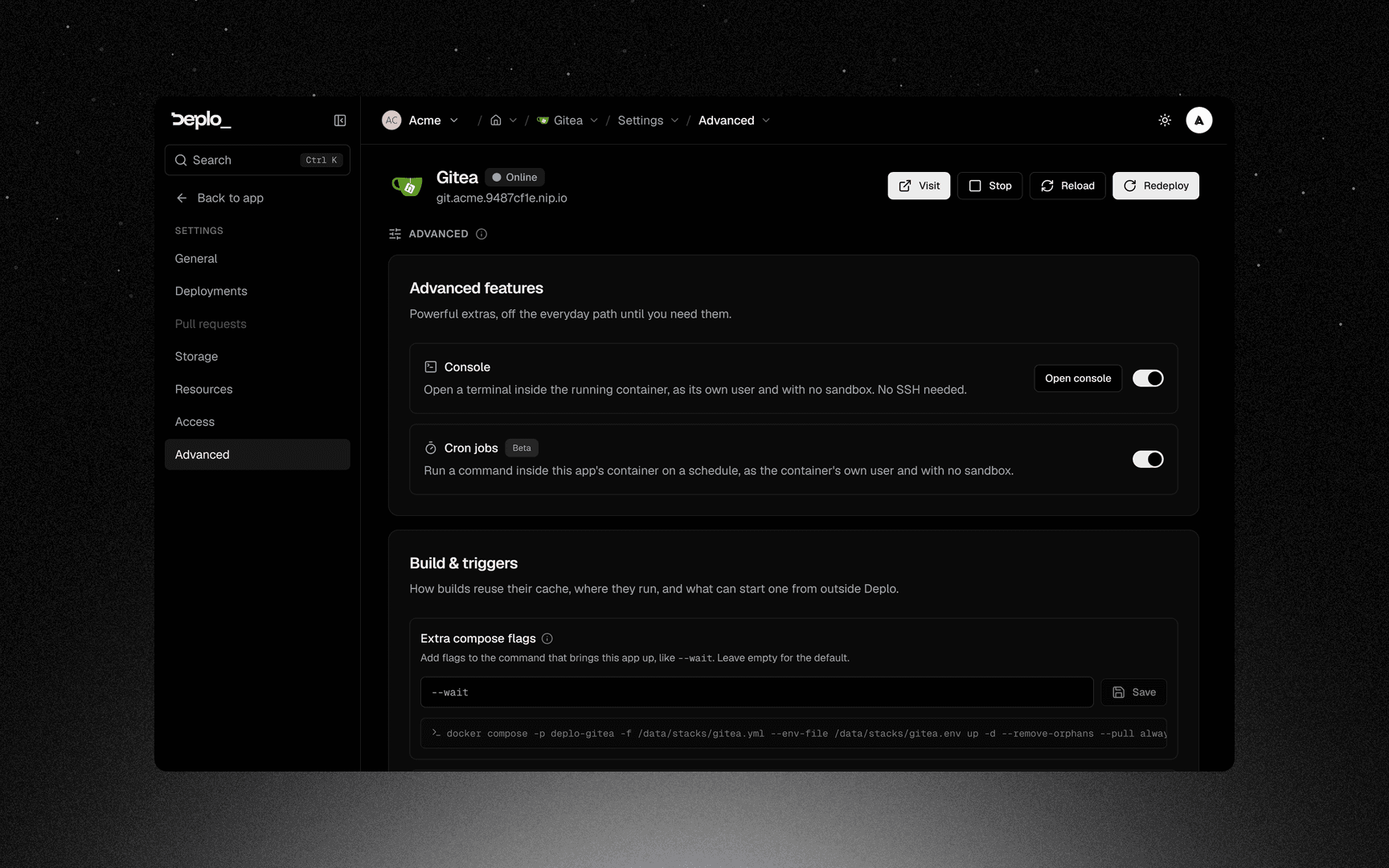
Settings -> Deployments -> Advanced settings -> Extra compose flags
passes additional flags to docker compose up, exactly as typed.
It is additive only: anything that would change the project name, the stack file, the project directory or the env file is refused, because those are how Deplo finds your stack again. The page shows the whole command as the server will run it.
Deplo's own part already ends in --pull always, which is what makes a
redeploy pick up a moved tag. A --pull of your own replaces it:
--pull missingkeeps an image that exists only on the server, for example one you loaded by hand. Without it, a redeploy fails withpull access denied.--waitmakes the deploy wait for every service's health check.
Important behavior
version:andports:are usually noise here. Deplo routes through Traefik, so publishing a host port is rarely what you want, and it needs the port-exposure grant.- When you do publish one, name an address.
- "53:53/udp"claims every address on the machine, the private ones included, and on port 53 that takes over the machine's own DNS - every other app then stops resolving names. Write the public address instead:- "203.0.113.10:53:53/udp". The editor warns you when port 53 is published without one. - Variable values do not appear in the file. They ride in the env file,
which is why a rendered stack shown back to you has bare
- KEYentries. - A rendered stack is masked on display, values and the basic-auth hash alike.
- Everything that reaches out of a container is gated. See Host access for the full list, which is longer than most people expect.
- The agent does not re-validate your YAML. The checks that matter happen on save and on deploy, not on the agent.
Troubleshooting
- The editor flags or refuses a service name - it is a name the platform or a managed
database answers to. Rename the service, or its
hostname:if that is what the message names. cannot resolve host, and the name is another app - that app is in a different environment, and nothing crosses an environment boundary. Move one of them so both sit in the same one. The deploy log names it before the container ever tries. See Network isolation.- Two services in the same stack cannot see each other - they must be in the same stack with distinct names.
- A domain points at a service and nothing answers - check whether that
service sets
network_mode. Any form of it (host,service:vpn,container:x) keeps the container off its own network, so Traefik cannot reach it and no router is written. The editor warns about this. Route a service that has its own network instead - with a VPN sidecar, that is usually a small proxy in front of it. compose upfails on a flag - your extra flags are passed verbatim. Check them.pull access deniedon a redeploy, and the image was never in a registry - it exists only on the server. Add--pull missingto the extra flags. A private registry image wants a credential instead, see Container registries.- Domains show no container to pick - the file did not parse. Fix the lint errors first.
Still stuck? See Deploys and builds troubleshooting.
See also
Did this page help you?