
A container's own filesystem is deleted every time it is recreated. Uploads, caches and databases need a mount to survive a deploy.
Everything here is in Settings -> Storage, in the Mounted storage card.
| Kind | What it is | Needs permission |
|---|---|---|
| Volume | Disk space Deplo creates and manages for this app. The normal choice | no |
| File | A file you write in the browser, placed inside the app. For config files | no |
| Bind | A folder that already exists on the server, shared with everything else on that machine | yes |
- A Volume is named
deplo-<slug>-<name>on the host. Removing the row stops mounting it but does not delete the data. - A File is written before the container starts, so Docker never turns it into an empty folder by mistake.
- A Bind reaches outside Deplo's control. For security reasons it needs the "Bind server folders" permission.
A Compose app's own mounts
A Compose app can declare storage in its own docker-compose.yml and
also have Storage rows. A row names the service it mounts into.
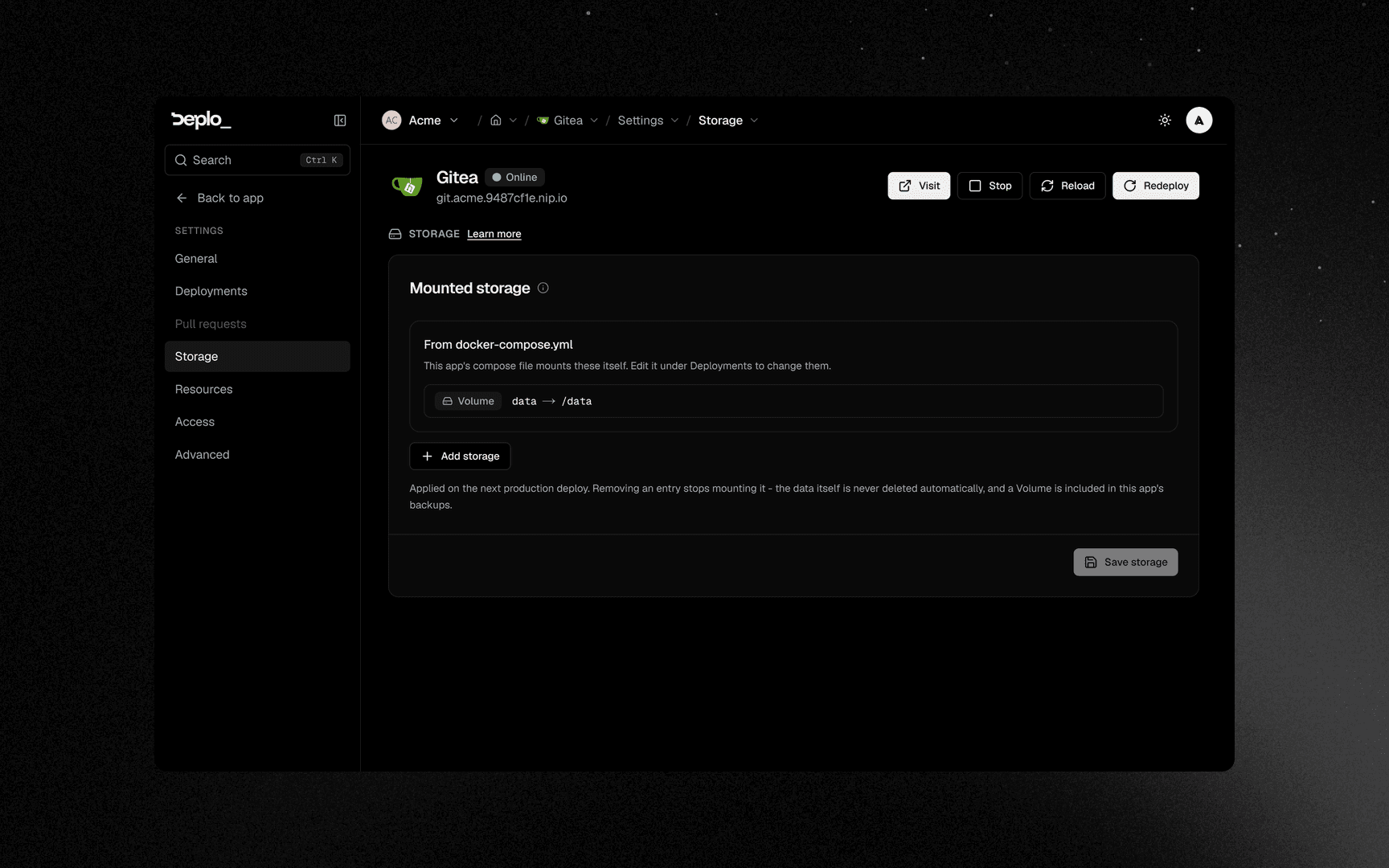
Settings -> Storage lists the compose file's mounts read-only, under From docker-compose.yml. To change them, edit the compose file under Deployments.
A ./<path> source that does not exist yet is created before the container starts:
- a name that looks like a file (
config.yml,nginx.conf,Caddyfile,.env) becomes an empty file - anything else (
./data,./conf.d,./html) becomes an empty folder
The compose file wins on the same path
A Storage row on a path the compose file already mounts is ignored. Change the YAML instead.
What deleting the app removes
| Kind | When you delete the app |
|---|---|
| Volume | Erased. Deplo removes deplo-<slug>-<name> on the server |
| File | Erased. The app's files directory goes with the stack |
| Bind | Left alone. The folder belongs to the server, not to Deplo |
A Bind is yours to remove
Deleting the app does not delete a bound folder, and server cleanup never removes server folders. Note the paths before you delete the app, and remove them on the server yourself.
In a Compose app, Deplo only removes the volumes it owns, named
deplo-<slug>-<name>. A volume marked external: true or with a custom name survives.
Add storage
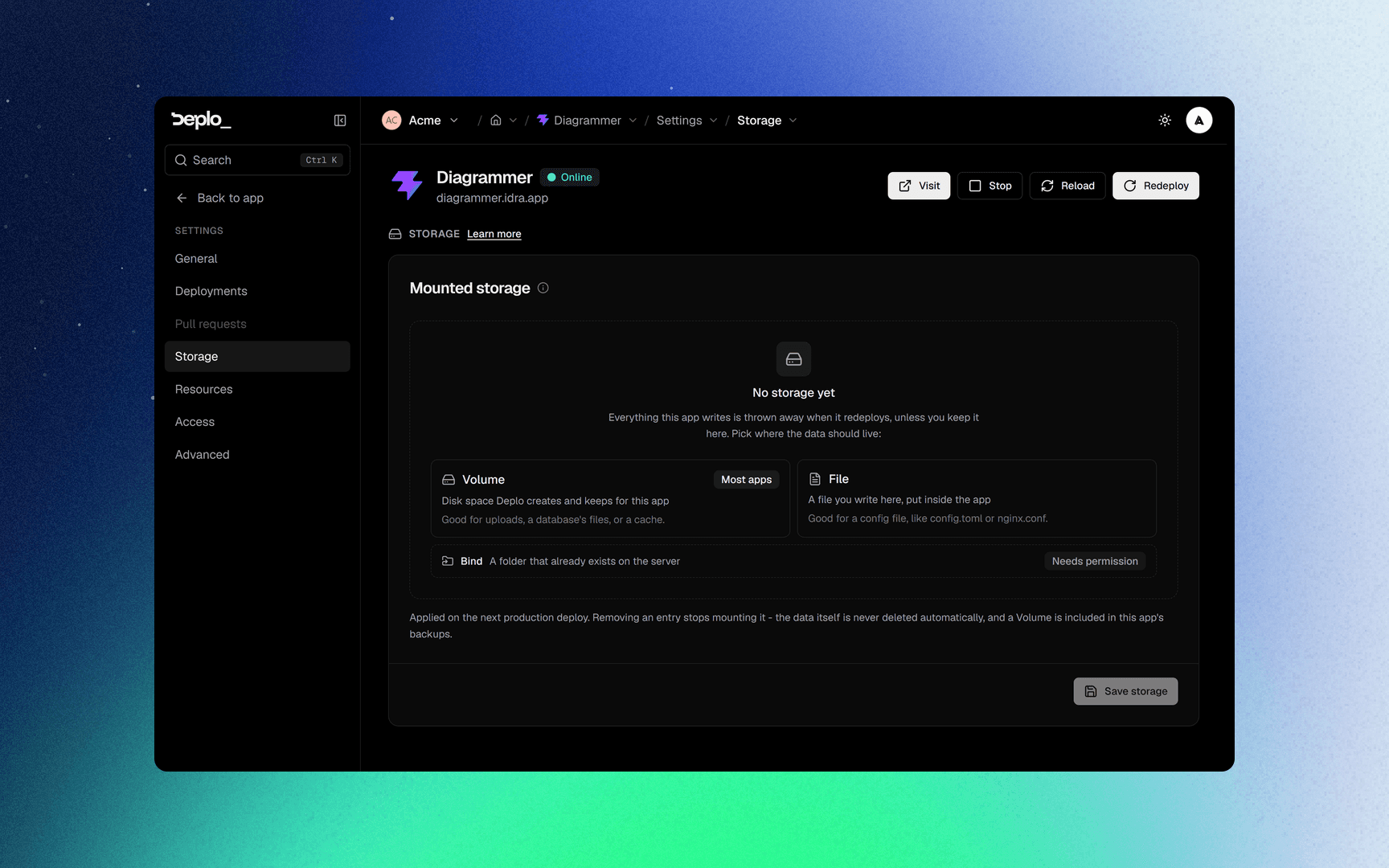
Add storage
Click Add storage and choose the kind.
Fill the source
A Name such as uploads.
Set the mount path
The path inside the container, for example /app/uploads.
Optional: pick a container
For a multi-container app, name the Container to mount into.
Save and redeploy
Click Save storage, then redeploy.
For an app Deplo builds, the mount path can be left blank: uploads becomes /app/uploads. For a
prebuilt image or a Compose service you must type the full path.
Bind options
A Bind row has two extra controls. The first is labelled What if something is mounted inside this folder?:
Prop
Type
Without rslave, a network share or a FUSE mount attached after the container started never
appears inside it.
Good to know
- Storage applies on the next deploy.
- Data is never deleted by a redeploy, a source change, or removing the row. Only deleting the app erases Volume and File storage. See what deleting the app removes.
- A Compose service name that does not exist is an error.
- Do not put a database's data in a Bind. A managed database already has its own volume.
- A File is for text config, at most 1 MiB. A binary or bigger file already on the path stays as it is.
- Backups of an app include its files. They do not include its databases.
Move an app to another server
Settings -> General, then Move on the Server card. Pick the new server and confirm. The card appears only when you have more than one server.
- Deplo redeploys the app there and copies its data first. The app is offline during the copy.
- If the copy fails, the app goes back to its old server. If the old server cannot be reached, the app is kept stopped on the new one: redeploy when the old server is back, or press Deploy anyway to start without the data.
- Apps it reached by name stay behind. The dialog names them before you confirm.
- A volume Deplo cannot find on the old server stays there. The deploy log names it.
- A Bind and an
external:volume do not move. They belong to the server.
Troubleshooting
- The data disappears on deploy - the path the app writes to is not mounted.
- Permission denied inside the container - the container's user does not own the directory. For a Bind, fix ownership on the server. For a Volume, make sure the image creates the directory as its own user.
- A Bind row will not save - you do not have the permission. See Host access.
More in Servers and agents.
Next steps
Did this page help you?